AI Twitch Clipper for StreamersTurn Long Streams Into
Viral Clips in Minutes

VODJet is an AI Twitch clipper for streamers who want to turn long VODs into ready-to-post TikTok, Reels, and YouTube Shorts clips without spending hours editing. You drag your Twitch stream file into the app, tell it where your facecam and gameplay are, and in minutes you get vertical clips you can upload directly to short-form platforms.

Find the best moments in your Twitch VODs, auto-stack gameplay and facecam for vertical video, add captions, and export clips ready to post — all on your PC.

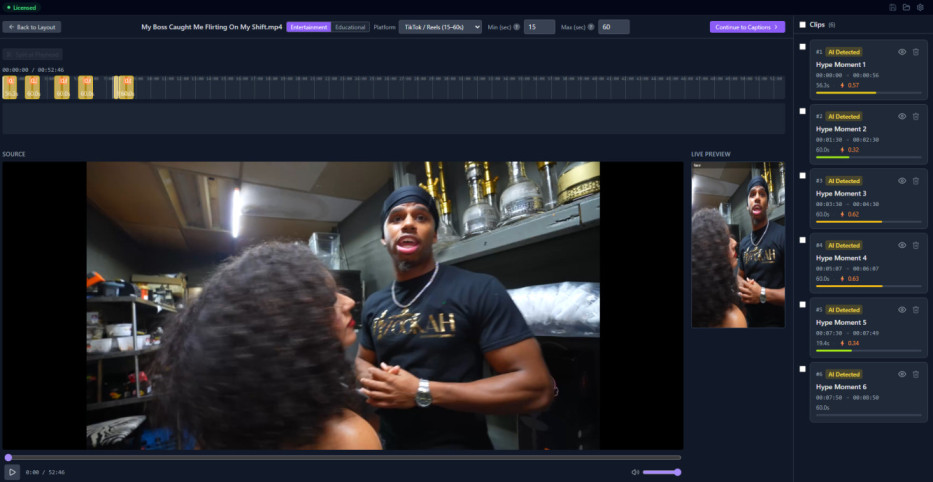
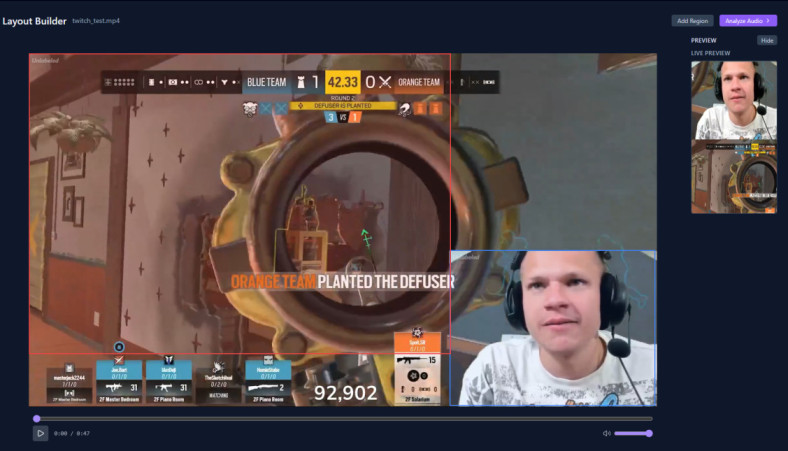
VODJet desktop app — AI Twitch clipper dashboard showing clip timeline and vertical layout builder

Pain Points for Streamers

If you stream regularly, you know exactly how painful clipping your VODs can be.

Editing Twitch VODs Takes Too Long

Most streamers record 4–8 hour sessions and then stare at their VODs, trying to find the hype moments by hand. Scrubbing through long streams to clip highlights can easily take 1–2 hours per day — time you should be streaming or resting.

  • I need to clip my Twitch VODs faster.
  • I want to spend less time editing and more time streaming.
  • I'm tired of manually finding clutch moments in 6–8 hour streams.

Uploading Huge Stream Files Slows Everything Down

Most AI clip tools force you to upload your full Twitch VODs to the cloud. If you stream in 1080p at 60fps, those files can be 10–30GB or more. Uploading, waiting for processing, and then downloading can take 30–90 minutes — and that's just for one clip.

Most AI Clip Tools Miss the Best Gaming Moments

Generic AI clip tools are built for talking-head videos, not fast-paced games like Valorant, Fortnite, or League of Legends. They often pick the wrong moments, cut you off mid-scream, or ignore the exact second a clutch happens because they don't understand gameplay context.

Monthly Credits Make Daily Clipping Expensive

If you clip every day, monthly credit systems quickly become a problem. You run out of credits, your workflow breaks, and you either pay more or skip clips. For streamers who post daily, this feels like paying a tax just to grow your audience.

Why Streamers Choose VODJet Over Cloud Clip Tools

See how a local-first approach stacks up against subscription-based cloud alternatives.

Cloud Subscriptions

  • Slow uploads for 10–30GB VOD files.
  • Monthly credits that run out.
  • Built for generic talking-head creators.
  • Awkward cropping that doesn't look native.
  • Requires accounts and complex SaaS dashboards.

VODJet

  • Run directly on your PC — no long uploads for 10–30GB VODs.
  • No monthly credits — one-time $99 lifetime license fits daily streamers.
  • Designed for gaming streams, not talking-head content.
  • True vertical layout for facecam + gameplay that feels native on TikTok and Shorts.
  • No extra account, no complex AI-editor suite — just clips out of your VODs.

What an AI Stream Clipper Should Do

VODJet is an AI stream clipper built specifically for gaming streamers. It scans your long Twitch VODs, finds the best moments, formats gameplay and facecam for vertical clips, adds captions, and exports ready-to-post videos — all on your PC, without cloud uploads.

Step 01

Scan Long VODs and Find Highlight Moments

Drag your 6–8 hour stream into the app and let VODJet scan the audio, transcript, and on-screen action. It highlights kills, clutches, funny fails, and hype reactions so you don't have to scrub through every minute.

VODJet VOD scanning — coming soon
Step 02

Convert Gameplay to Vertical Clips for TikTok, Shorts, and Reels

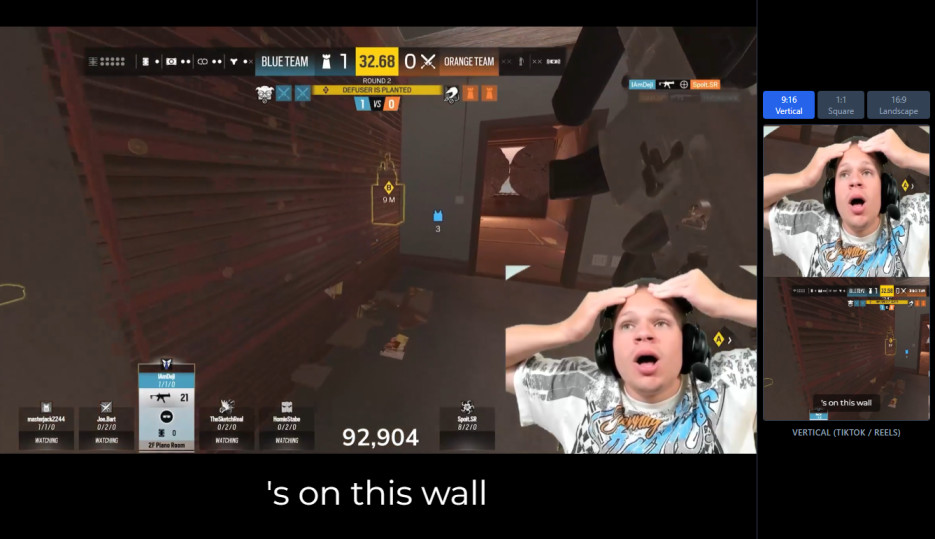
Once it finds a moment, VODJet reshapes it into 9:16 vertical clips perfect for TikTok, YouTube Shorts, and Instagram Reels. You can keep your facecam on-screen, frame gameplay correctly, and avoid awkward cropping.

VODJet vertical 9:16 clip preview showing facecam stacked above gameplay
Step 03

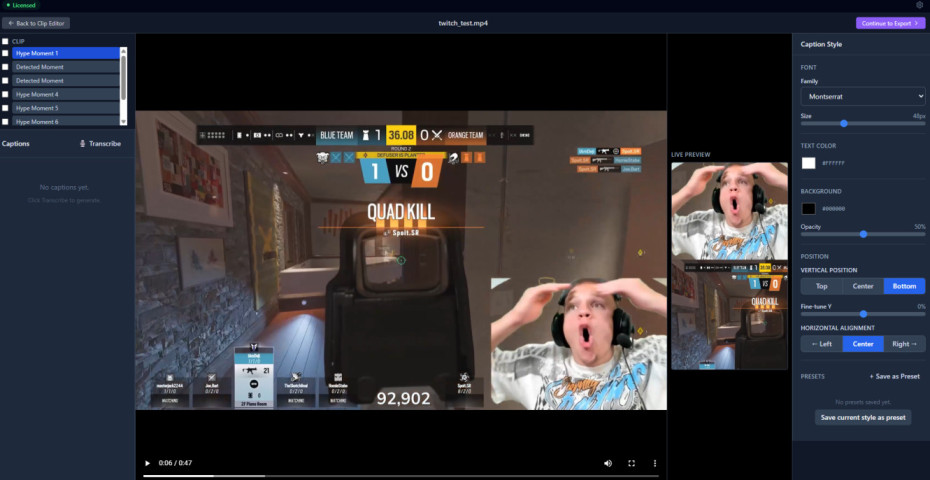
Add Captions Automatically

Captions are baked into the clips, so viewers can watch without sound. The text is synced to your speech so timing feels natural and you don't have to edit subtitles afterward.

VODJet automatic caption editor — coming soon
Step 04

Export Clips Ready to Post

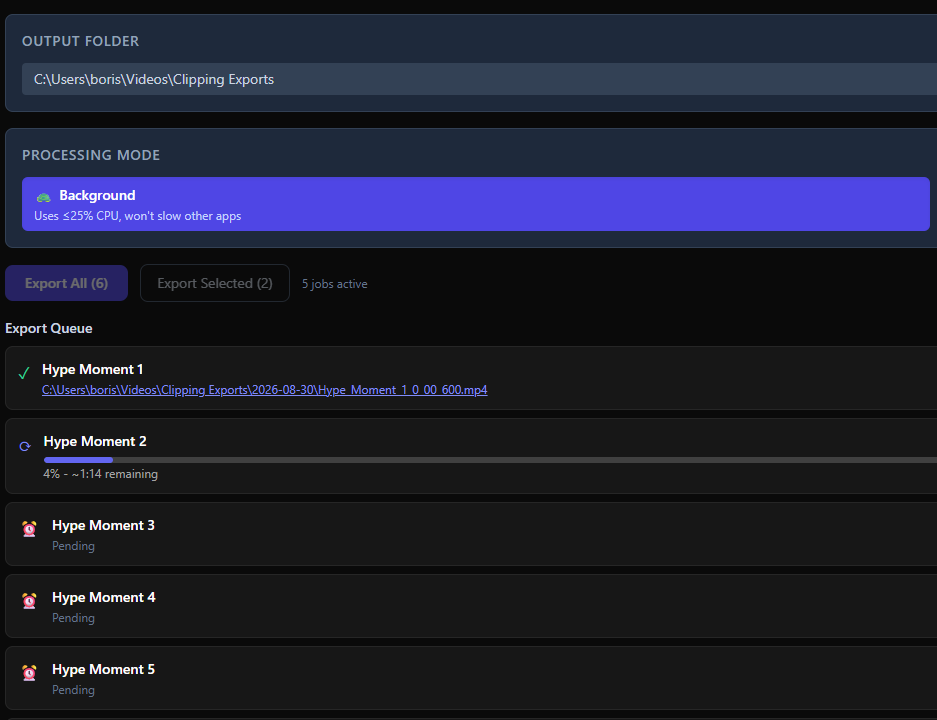
You get a folder of clean .mp4 clips, each labeled with timestamps like Valorant_Clutch_00-42-18.mp4. Drag them into TikTok, Shorts, or Reels and hit publish — no extra trimming.

VODJet exported clips folder with timestamped filenames — coming soon
Step 05

Keep the Workflow Simple for Streamers

No complex dashboards, no confusing settings. Draw boxes around your facecam and gameplay, pick TikTok/Shorts/Reels, and click Generate. You can clip every stream before lunch without learning new editing software.

VODJet simple streamer workflow — coming soon

Features Streamers Actually Need

VODJet is not a full-sized editor; it is a focused, no-fluff clipper built for one job: turning long streams into short-form clips.

Auto highlight detection finds kills, clutches, laughs, and key moments.

Facecam + gameplay vertical layout 9:16 output for TikTok, Shorts, and Reels.

Auto captions burned-in text synced to your voice.

Clip timestamps each file labeled with Game_Moment_00-42-18.mp4.

Fast local processing no cloud upload, no waiting for remote servers.

TikTok, Reels, Shorts presets one-click formatting for each platform.

PC-only, no-subscription buy once and clip as much as you want.

Built for Every Type of Gaming Streamer

Whether you play FPS, battle royale, or stream across multiple platforms, VODJet adapts to your game.

AI Twitch Clipper for Valorant Streamers

If you play Valorant, VODJet can find your 1v5 clutches, insane plant defuses, and funny agent interactions. Auto-stack your facecam and gameplay, add captions, and post vertical clips that attract new Twitch followers.

VODJet vertical clip preview — coming soon

AI Clip Maker for Fortnite Highlights

Turn your Fortnite games into TikTok-ready edits with kills, snipes, emotes, and crazy moments. The AI focuses on action beats so your Reels and Shorts feel fast and exciting.

VODJet vertical clip preview — coming soon

Twitch VOD Clipper for Call of Duty Creators

Whether you play Warzone, Modern Warfare, or competitors, VODJet adapts to fast-paced gunplay and finds your best kills, plays, and reactions.

VODJet vertical clip preview — coming soon

AI Gaming Highlight Maker for Kick and YouTube Streamers

If you stream on Kick or YouTube, the same workflow works: drag your VOD, draw facecam and gameplay regions, and export vertical clips you can post to TikTok, Shorts, or Reels to grow your audience across platforms.

VODJet vertical clip preview — coming soon

Built for Streamers Who Want to Grow Faster

Streamers like Tyler, a mid-tier Valorant creator, already use VODJet to clip every stream and post 5–10 clips per day to TikTok and Shorts. They report hours saved per week, steady follower growth, and no more “I should clip this later” guilt.

I went from 0–10 clips per day without increasing my editing time.

Valorant Streamer

No more waiting for cloud uploads; my 8-hour VODs just run on my PC.

Fortnite Creator

It actually finds my best moments, not just random talking clips.

CoD Content Creator

One Price. Forever.

Stop paying monthly. Buy once and clip every stream for life.

Lifetime License
$99one-time

Pay once. Own it forever. No subscriptions, no monthly credits, no cloud uploads.

  • Auto highlight detection — kills, clutches, laughs
  • Facecam + gameplay vertical 9:16 layout
  • Auto captions — burned-in, synced to voice
  • Clip timestamps — Game_Moment_00-42-18.mp4
  • Fast local processing — no cloud upload
  • TikTok, Reels, Shorts presets
  • PC-only, no subscription — buy once
Download Now – $99 Lifetime(opens in new tab)

Secure checkout via Polar · Instant download after purchase

Frequently Asked Questions

Everything you need to know before downloading.